
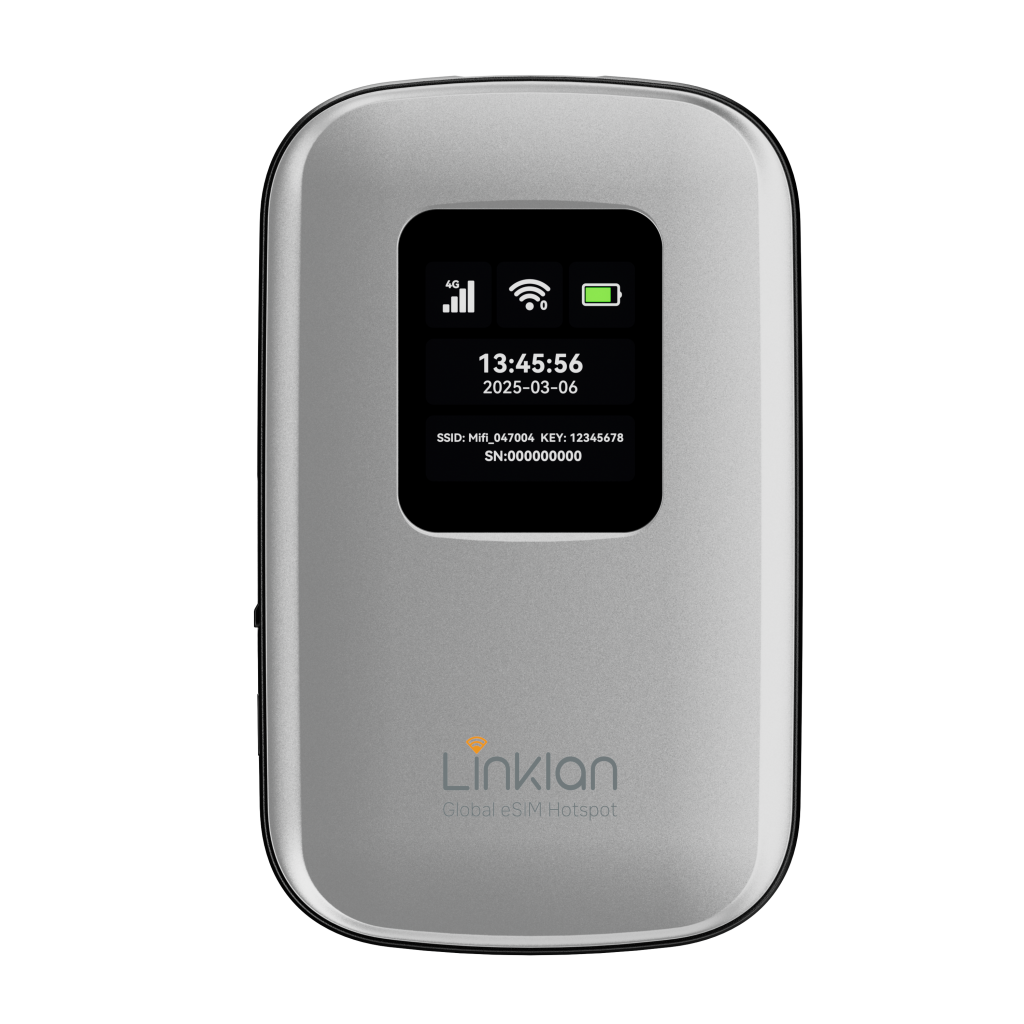
For remote workers, traveling families, and multi-device travelers, international mobile connectivity presents an ongoing challenge. Relying on smartphone personal hotspots drains phone batteries in three to four hours and triggers carrier tethering throttles. Meanwhile, traditional rental pocket Wi-Fi units (such as Skyroam or GlocalMe) lock you into expensive proprietary data stores or high-latency cloud routing. The arrival of open, carrier-unlocked hardware—headlined by the Linklan LA7 Global eSIM Hotspot—fundamentally changes the equation. By separating the mobile hotspot hardware from the data provider, travelers can load low-cost travel eSIM profiles from over 500 digital stores via QR code and broadcast a secure, private Wi-Fi network across 16 devices. Compare open hardware routers against closed rental units and smartphone tethering with the Linklan LA7 Global eSIM Hotspot.
SMARTROAM
1. The Multi-Device Friction: Why Smartphone Hotspots Fall Short
Most travelers start by using their smartphone as an impromptu mobile Wi-Fi hotspot. While functional for sending a quick email, using a phone as an all-day travel router introduces three structural bottlenecks:
- Thermal Throttling & Rapid Battery Degradation: Broadcasting a 2.4 GHz or 5 GHz Wi-Fi network while simultaneously processing incoming cellular data generates extreme internal heat. Modern smartphones protect battery health by aggressively throttling processor speeds and cutting cellular modem throughput. A flagship battery depletes in 3 to 5 hours under continuous hotspot duty.
- Carrier Tethering Throttles: Many consumer travel eSIMs and domestic carrier roaming passes enforce strict Fair Usage Policies (FUP) specifically on tethering. Handsets often face data speed drops to 128 kbps or outright hotspot blocks when attempting to connect a laptop or secondary tablet.
- Tethering Range Constraints: A smartphone’s internal omnidirectional Wi-Fi antenna is optimized for power efficiency, not broadcast distance. Moving more than five meters away from the host phone in an Airbnb or hotel room causes packet drops and high latency.
2. Open eSIM Hotspots vs. Proprietary Cloud SIM Routers
To solve the multi-device problem, frequent travelers historically turned to portable pocket Wi-Fi units. However, mobile routers operate on fundamentally different technical architectures:
Proprietary “Cloud SIM” Units (GlocalMe, Skyroam)
Traditional travel hotspots use proprietary virtual SIM (vSIM) platforms. You buy the hardware, but you are permanently locked into the manufacturer’s proprietary data store. Pricing is rarely competitive ($6 to $12 per gigabyte), and data sessions route through distant cloud servers, adding 300ms+ of ping latency to everyday navigation and video calls.
Physical SIM Pocket Routers (Netgear, Huawei)
Standard unlocked 4G/5G mobile routers require inserting a physical plastic SIM card. While they avoid proprietary software lock-in, they subject you to airport retail queues, local passport KYC verification checks, and the hassle of swapping tiny plastic chips at every border crossing.
Open eSIM Hotspots (Linklan LA7)
The Linklan LA7 combines the flexibility of an unlocked router with the convenience of GSMA eSIM technology. It features an onboard eUICC chip and Bluetooth provisioning. Travelers scan any standard eSIM QR code from open aggregators into the companion mobile app. The profile flashes directly onto the hardware, connecting directly to local Tier-1 cellular towers.
Wholesale Market Freedom
Because the hardware is completely carrier-unlocked, you are never held hostage by proprietary vendor rates. You can shop open marketplaces for wholesale data (averaging $1.00 to $2.00 per GB), load a 20GB or 50GB regional bucket, and broadcast unthrottled high-speed data to your entire gear bag.
Hardware Breakdown: Technical Specifications of the Linklan LA7
For technical buyers and travel planners, the Linklan LA7 delivers enterprise-grade portable routing specifications designed for heavy field usage:
| Hardware Specification | Linklan LA7 Global eSIM Hotspot | Standard Travel Router / Phone Hotspot |
|---|---|---|
| Cellular Architecture | ⚡ 4G LTE CAT6 (Carrier Aggregation up to 300 Mbps) | Basic CAT4 (150 Mbps) or thermal-throttled handset |
| eSIM Freedom | ⚡ Fully open GSMA eUICC (Download any QR code) | Locked proprietary vSIM store or physical SIM slot only |
| Concurrent Client Connections | ⚡ Up to 16 devices simultaneously | 5 to 8 devices (Causes extreme phone battery drain) |
| Battery Capacity & Runtime | ⚡ 5,000mAh lithium battery (12 to 24 hours active runtime) | Phone hotspot shuts down after 3 to 4 hours |
| On-Device Status Display | 1.8-inch SPI color screen (Data usage, signal, SSID) | Limited LED blinking lights or requires phone unlock |
| Charging & Power Bank | USB-C input/output with reverse charging capability | Micro-USB or drains phone internal battery |
| Global Frequency Bands | Comprehensive FDD/TDD-LTE coverage across 180+ nations | Regional band locks (US vs. EU model limitations) |
Pairing Open Hardware with Wholesale Marketplaces
An unlocked travel router is only as cost-effective as the cellular data loaded onto it. Rather than buying high-margin packages through closed hardware apps, pair your router with open wholesale data from platforms like MobiMatter.
Deploying a dedicated open hotspot with marketplace eSIM passes provides four practical operational advantages:
- Cost-per-Gigabyte Optimization: Secure large 20GB, 30GB, or 50GB multi-country regional data buckets at wholesale prices ($0.80 to $1.50 per GB), eliminating the need to pay daily roaming fees on multiple phones.
- Preserved Primary Smartphone Battery: Your smartphone connects to the LA7 via standard Wi-Fi, leaving its internal cellular radio in low-power standby for navigation, photography, and incoming 2FA verification SMS.
- Universal Device Support: Wi-Fi-only hardware (including work laptops, iPads, Kindles, and handheld gaming consoles) connects securely without requiring native cellular modems or device upgrades.
- Local Breakout (LBO) Speed: Choose wholesale profiles that prioritize local regional gateways, keeping ping latency low for video conferencing, VoIP calls, and real-time mapping.
3. Step-by-Step Setup: Provisioning an eSIM onto a Portable Hotspot
Setting up an open hardware hotspot requires a simple five-minute procedure before departure:
- Purchase Your Data Profile: Select your destination or regional data package on your preferred eSIM marketplace 1 to 2 days prior to your trip. Receive your setup confirmation containing the installation QR code and LPA activation string.
- Connect Hotspot via Bluetooth: Power on the Linklan LA7 router. Open the companion Linklan management app on your iOS or Android smartphone and pair with the device over Bluetooth 5.0.
- Flash the eSIM Profile: In the management app, select “Add eSIM” and scan your eSIM QR code. The app transmits the profile directly to the router’s eUICC modem in seconds.
- Configure Private Wi-Fi Credentials: Set your private network SSID and WPA2/WPA3 security passphrase on the hotspot display. Connect your family’s phones, laptops, and tablets to the network.
- Power On at Destination: Once your aircraft touches down, power on the router. The device automatically latches onto local Tier-1 partner networks, providing instant, secure internet to every connected device in your travel group.
Actionable Tip: The Linklan LA7 features reverse-charging functionality. If your smartphone battery runs low during an emergency transit delay, use a USB-C to USB-C cable to draw backup power directly from the hotspot’s 5,000mAh battery reserve while remaining connected to the internet.
Leave a Reply